This is our first product update of 2026, and we’ve been busy.
Over the past month, we shipped a wave of updates that may have flown under the radar: our IronRidge integration, new fire setback capabilities with AI edge classification, improved segment editing, and better project organization tools.
The goal of all these releases is to create a more intuitive experience when designing and navigating in Scanifly, reduce clicks, and maintain the accuracy and precision we’re known for. You’ll see this theme a lot this year, and we’d love to hear your feedback on how we’re doing.
Here’s what’s new.
What We Shipped
🔗 IronRidge Integration
What It Is: Direct API integration automatically transfers Scanifly design data and panel placement into IronRidge Design Assistant. One-click export from your design to racking, BOM, and engineering documents. No manual recreation of array layouts needed!
Why It Matters: Eliminate duplicate work, ensure accurate inventory for install day, and prevent costly revisions and equipment shortages. Scanifly’s drone-based precision means exact measurements flow directly to IronRidge, so rails are neither over- nor under-ordered. Works with XR or Aire racking systems and preferred attachments like FlashFoot2 or HUG. Learn more about the integration.
Note: IronRidge is our sixth racking partner integration alongside Pegasus, EcoFasten, K2 Systems, Unirac, and SnapNrack. One-click exports to the design assistant of your choice, no vendor lock-in, just flexibility for your workflow.
🔥 Automatic Fire Setbacks by Edge Type
What It Is: Fire setbacks now automatically classify roof edges into three types—Ridge, Eave, and Other—and apply different setback values for each. Create multiple preset profiles in your settings, and setbacks apply when you draw new roof segments.
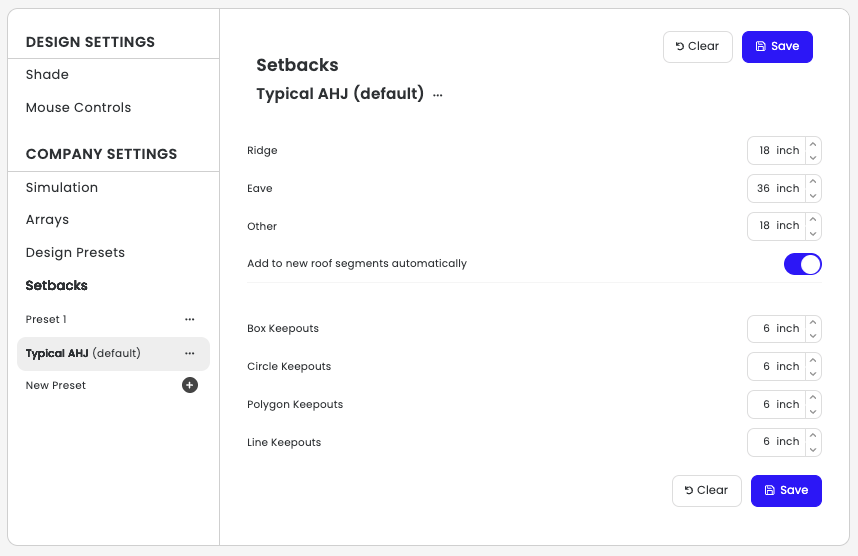
Why It Matters: Different edge types require different setbacks per AHJ requirement, and manually adjusting each edge can be tedious. Now the AI automatically classifies edges (Ridge and Eave are the most accurate), and you can create preset profiles for different jurisdictions.
Note: “Other” currently groups rake, hip, and valley edges together, since these typically use similar setback values.
🤖 SolarAI + ASA/TSRF Minimums
What It Is: SolarAI now properly respects your ASA and TSRF minimum thresholds when generating initial designs.
Why It Matters: The AI will only place modules in areas that meet your set minimums, saving you from doing as much manual design cleanup.
🔌 API Simulation Presets
What It Is: When creating designs via API, you can now specify simulation setting presets that automatically apply to projects in the 3D design environment.
Why It Matters: When projects are created through integrations, the correct simulation settings apply automatically, reducing validation issues and failed approvals. This is especially helpful for lender or proposal tool integrations, where a design may get rejected accidentally if settings are not preset.
✏️ Segment Editing in Outlines Pane Only
What It Is: Roof segments can now only be edited when the Outlines pane is selected for that segment (hotkey “1”). Additionally, when you click on a segment in the 3D scene, it activates the segment but automatically opens the Arrays pane instead of allowing immediate editing.
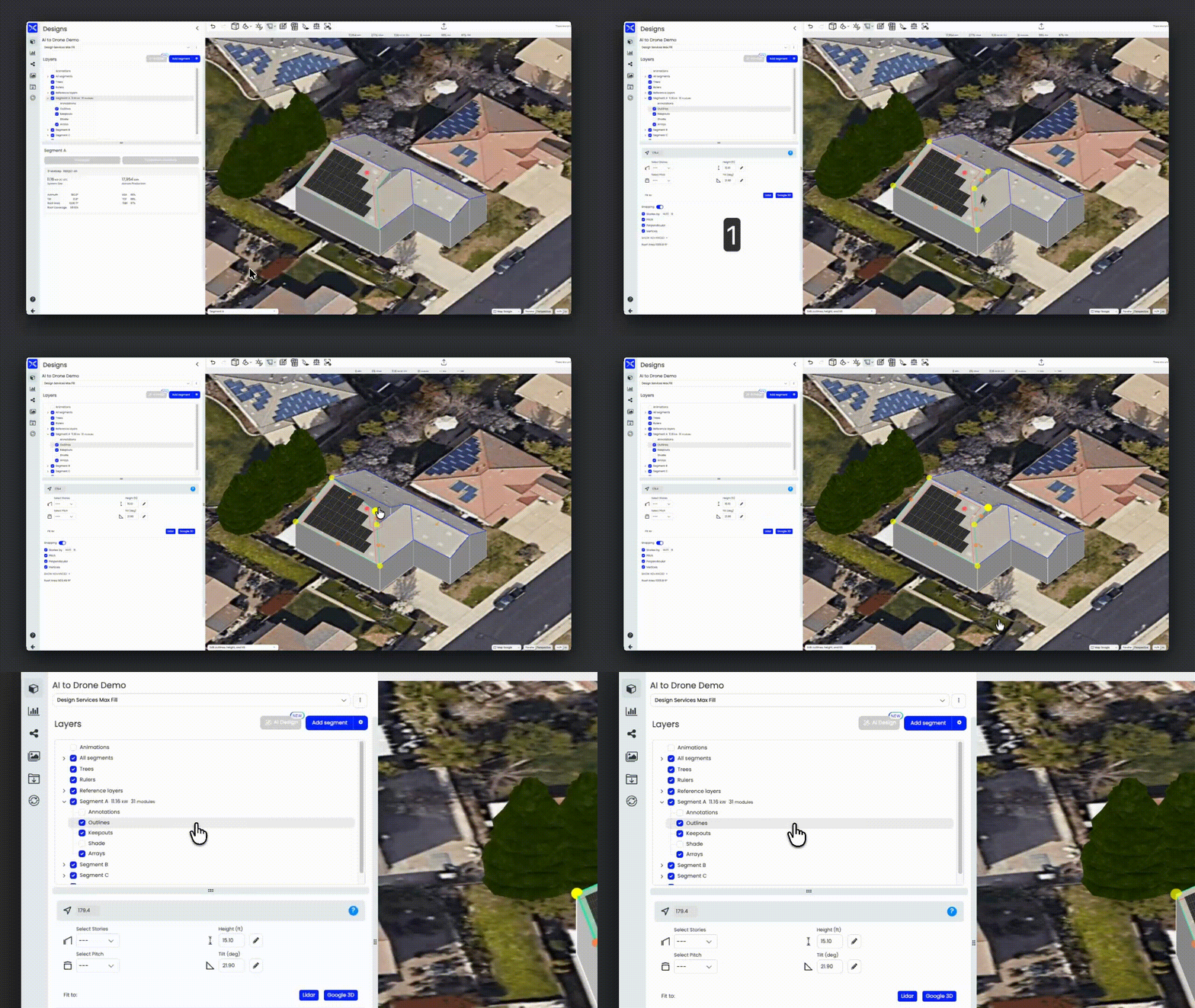
Why It Matters: This update prevents accidentally moving or adjusting roof segments while placing modules or adding keepouts. Previously, segments could be edited regardless of which pane was active, leading to unintentional changes. This guardrail ensures you’re editing segments only when you’re in the Outlines section.
What’s Coming Soon
📋 Copy-Paste Remote Design Segments
Edit the tilt, azimuth, and height of one roof segment, then copy those settings to multiple other segments at once. Especially useful for commercial projects with repetitive roof surfaces. Designers will have a full suite of segment actions (move, rotate, copy, and paste) available.
🌲 Occluders Update
Adding compatibility with Google 3D and LiDAR layers for simulating tree removal in your remote designs. Sales reps can now show customers production with and without specific trees before scheduling a site visit!
📚 Module Library Overhaul
Updating the module library to include the California Energy Commission’s pre-filled database with 20,000+ tested modules. Cleaner interface, better field organization, and support for more granular production simulations.
A Note on the Fire Setbacks Release
This feature has multiple interconnected pieces that will involve several iterative rollouts. If you’re experiencing setbacks not applying correctly (like only “Other” edges getting values), please send example projects to our support team so we can investigate.
As always, we welcome your feedback, so don’t hesitate to tell us what’s working and where we can be better.